
Browser Extensions
Compatible with all major enterprise-supported browsers, including Google Chrome, Mozilla Firefox, Microsoft Edge, Brave and other Chromium-based platforms, ensuring flexibility and scalability for your organization.
The Passwordstate Browser Extension empowers enterprises to enhance security and productivity with seamless password management. Designed for large-scale organizations, this solution integrates effortlessly into your workflows, enabling:
Automated Credential Management
Securely capture and store website logins directly into Passwordstate, ensuring compliance with organizational security policies.
Effortless Login Automation
Automatically populate login forms with encrypted credentials, reducing time spent on repetitive tasks while minimizing user errors.
Password & Passkey Generation
Generate strong, unique passwords directly from the browser extension while also supporting modern Passkey authentication.
One-Click Access
View password records within Passwordstate via an intuitive browser menu, enabling swift access for authorized users.
Feature Demonstrations
The following images demonstrate some of the features the Browser Extension has:
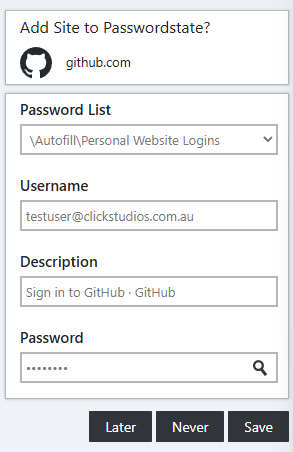
Saving a website login
Capture credentials from the browser and save them to Passwordstate.
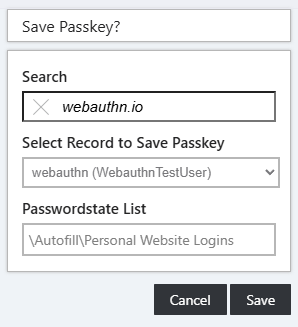
Registering a Passkey
For supported websites, the extension acts as a platform authenticator, enabling secure Passkey registration and authentication.
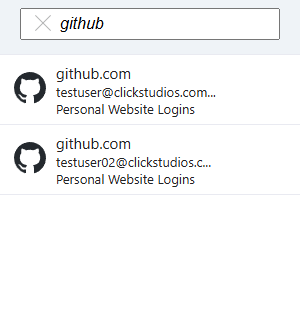
Searching your Vault
Quickly find credentials for a specific website directly from the extension menu, where you can see details or form-fill the credential.
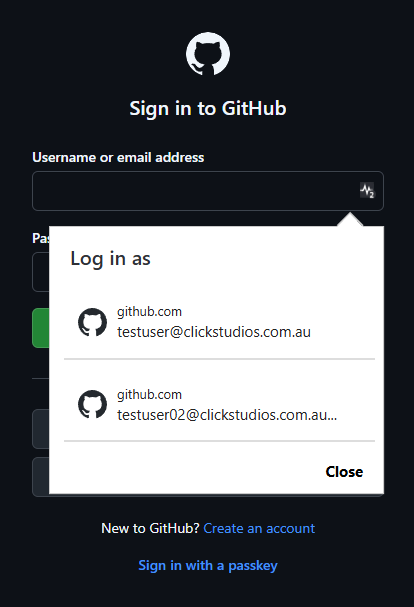
Credential overlay selection
Select the correct credential with a quick overlay when multiple records match.
Generate Long, Strong Passwords
As there's no need to remember your web site passwords anymore, you can generate new long and secure passwords directly from the Browser Extension menu. Passwords generated here follow your personal Password Generator settings within Passwordstate, allowing you to enforce enterprise password policies while maintaining strong security standards. For supported websites, the extension can also create and manage Passkeys, enabling modern passwordless authentication experiences.
