
Client Based Launcher with Microsoft Remote Desktop Gateway
Microsoft’s Remote Desktop Gateway (RDG or RD Gateway) is a Windows Server role that provides a secure encrypted connection to the server via RDP.
If you have a Microsoft RDP Gateway already set up, you can route your remote sessions directly from your desktop to the Microsoft RDP Gateway – which will then route traffic to the required Host. This is achieved in Passwordstate by modifying your host records and inserting the gateway parameters as per below example.
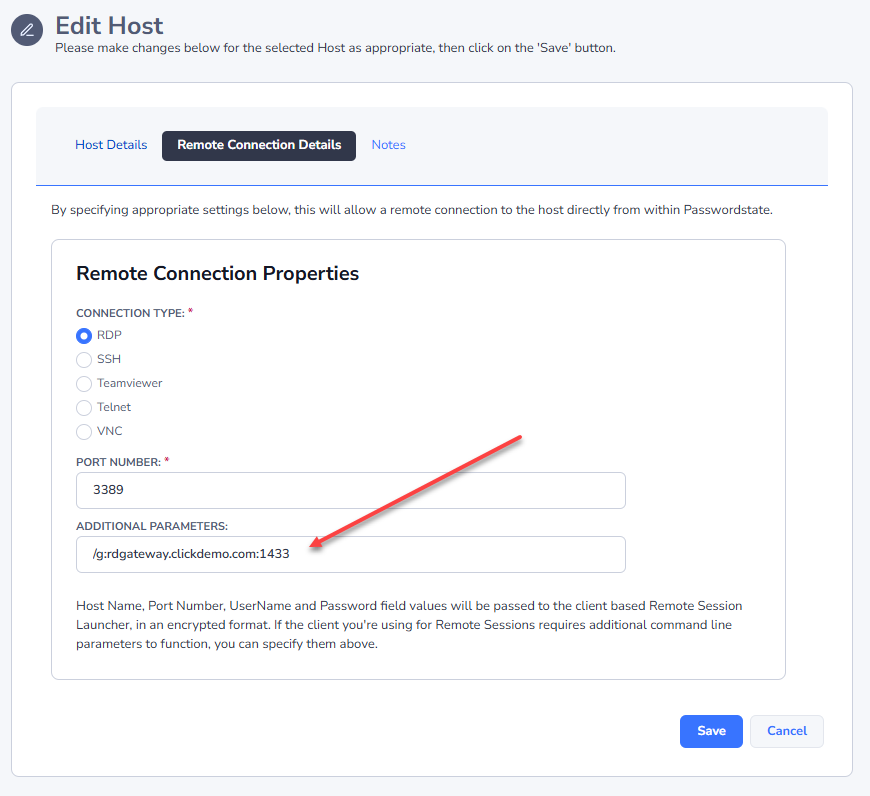
If you use the default port of 443 you do not need to append it on the end of your parameter. This port is only used to connect to the Gateway, and then it will use the standard port of 3389 to connect to your remote machine.
Other command line switches such as /Admin will work if you add them in.
Note 1: This gateway will only work with Domain accounts, not local Administrator or other Local Windows accounts. Please ensure the credential you set up to remote onto your machine has the account type of “Active Directory”.
Note 2: Routing traffic through Microsoft’s RDP Gateway is only possible with Click Studios’ Client Based Launcher. It is not possible using our Browser Based Launcher (gateway).