Browser Based Launcher Keyboard Shortcuts and FAQ
For RDP sessions within the browser-based launcher, there are a few shortcuts you can use which are listed below. Please note Control + C and Control + V should not be used to copy and paste files.
RDP Keyboard Shortcuts
- CTRL+ALT+END Brings up the Windows Security dialog box
- ALT+PAGE UP Switches between programs from left to right.
- ALT+PAGE DOWN Switches between programs from right to left.
- ALT+INSERT Cycles through the programs in the order they were started.
- ALT+HOME Displays the Start menu.
- CTRL + C allows you to copy text to and from a remote session (not suitable for file copy)
- CTRL + V allows you to paste text to and from a remote session (not suitable for file copy)
SSH Shell History
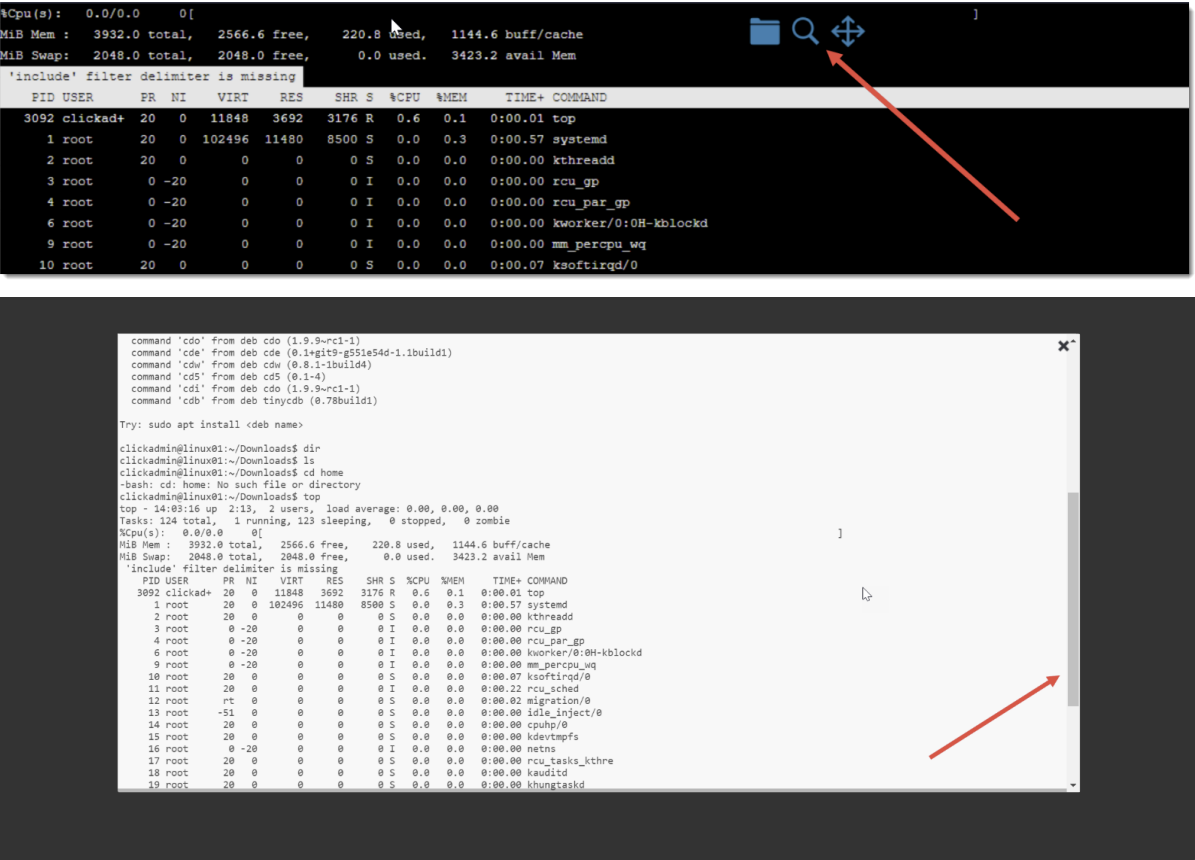
When in an SSH session, normally you can type history to get a complete history of commands for your session. With the Browser Based Launcher, if you left-click anywhere in the empty space within your SSH session, you’ll see this tool pop up at the top centre of your page a history window appears where you can scroll your entire session history, and then copy/paste as desired.