
Renewing the SSL Certificate
Once your certificate expires that you are using for the Remote Session Gateway, it will need to be renewed. To do that, please follow these instructions:
- Export your certificate, as per the section ‘Exporting Certificate from Passwordstate Server’ above – this assumes you are going to use the same certificate as your Passwordstate website
- Stop the Passwordstate-Gateway Windows Service
- Open PowerShell ISE as Administrator (Right click -> Run as Administrator) and copy in the code below. Ensure you change the password from Welcome123 to the password you set when exporting your certificate:
Powershell
cd C:\inetpub\Passwordstate\hosts\gateway
java.exe -cp SparkGateway.jar com.toremote.gateway.Encryption Welcome123 -q
This will give an output as per below screenshot:
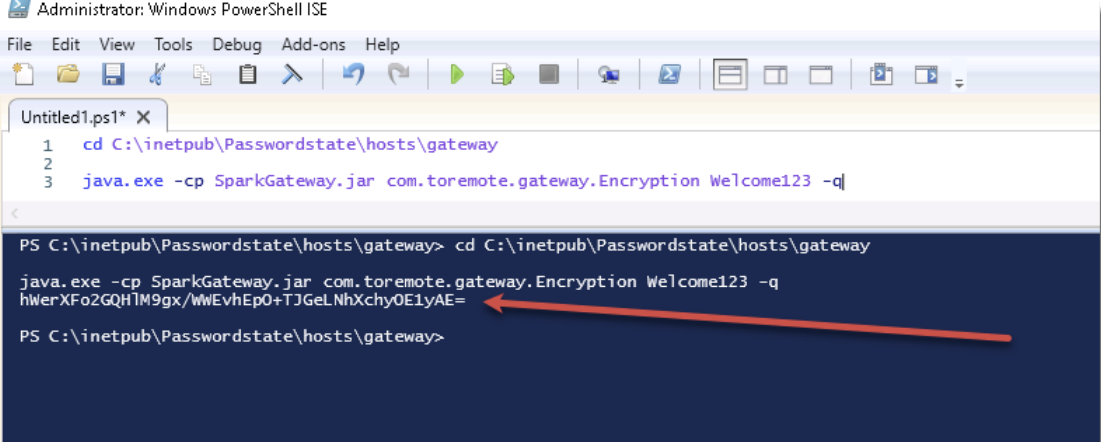
Note: Change the path of the gateway in the first line if appropriate
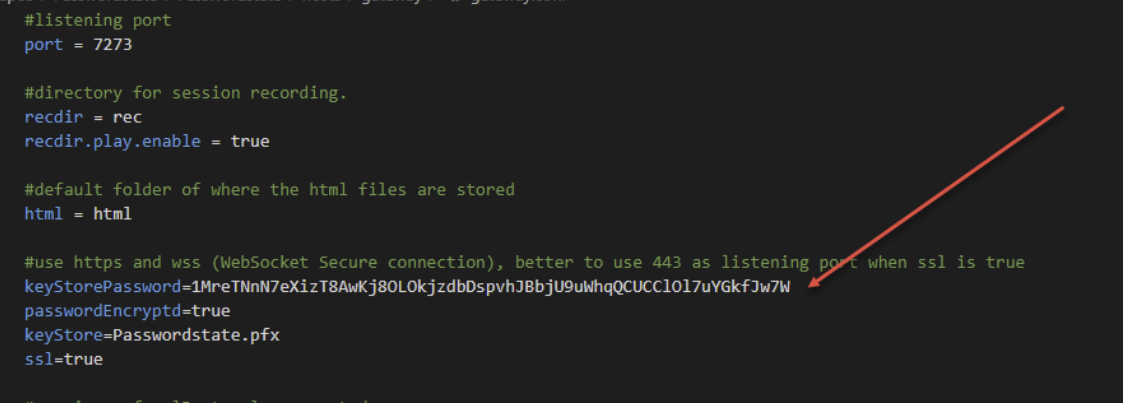
- Now open the file "C:\inetpub\Passwordstate\hosts\gateway\gateway.conf” and update the setting “keyStorePassword” with your encrypted password from the PowerShell session, as per the following screenshot
- Now restart the Passwordstate-Gateway Windows Service