Single Sign-On with Active Directory Accounts
If you choose the ‘Active Directory Integrated’ version of Passwordstate, it is also possible to configure Internet Information Services to allow single sign on for authentication.
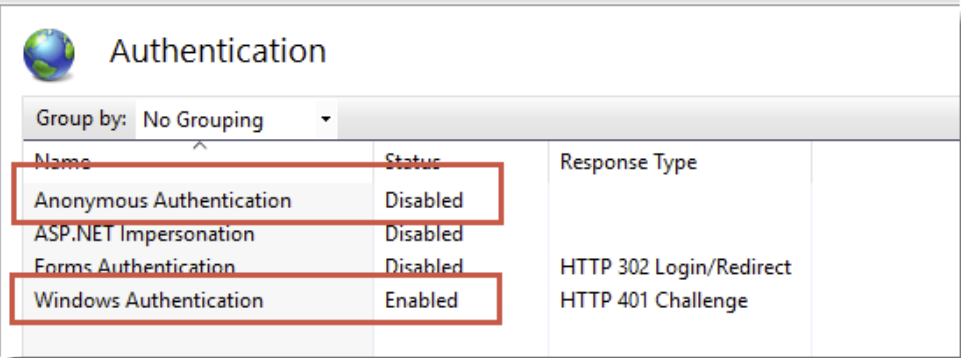
To do this, simply disable ‘Anonymous Authentication’ for the site in IIS, like in the screenshot below. Please note that when doing this, it may cause issues authenticating from Mac and Linux desktops
If after enabling single-sign on your browser prompts you for your domain credentials, then below is the most common cause of this.
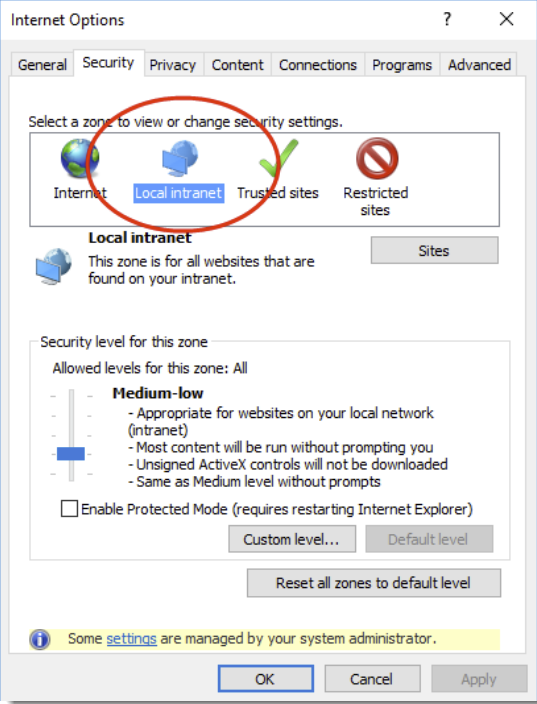
If using Internet Explorer or Chrome, check the Passwordstate website is being detected in the 'Local Intranet' security zone in Internet Explorer, and the option for 'User Authentication' is set to 'Automatic logon only in Intranet zone'.
You may need to add the URL of the site to a group policy, which forces Internet Explorer to detect that the site is in the intranet zone. Alternatively, each user can add this manually in Internet Explorer via the Internet Options -> Security Tab. Below is a screenshot of this setting.
If using Firefox, it does this by design. To fix this, you can install a Firefox extension called ˜Integrated Authentication for Firefox™. Now in your Firefox browser click Tools - > Integrated Authentication Sites -> Enter in your Passwordstate URL - ensure there is no backslash on the end - eg https://passwordstate.yourdomain.com