Remote Site Tables
With each Agent install, there are certain tables in an SQLite database which will be populated with data via your Passwordstate API.
When you first install the Agent, these tables will be populated accordingly when the Passwordstate Agent Windows Service first starts, and they will also be refreshed at the beginning of the Maintenance Window you specify for each of the Remote Site Locations.
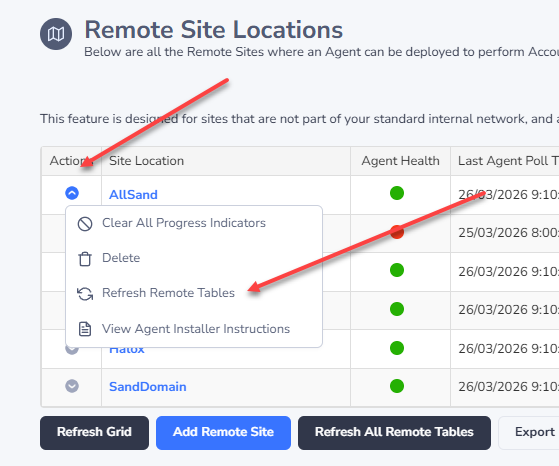
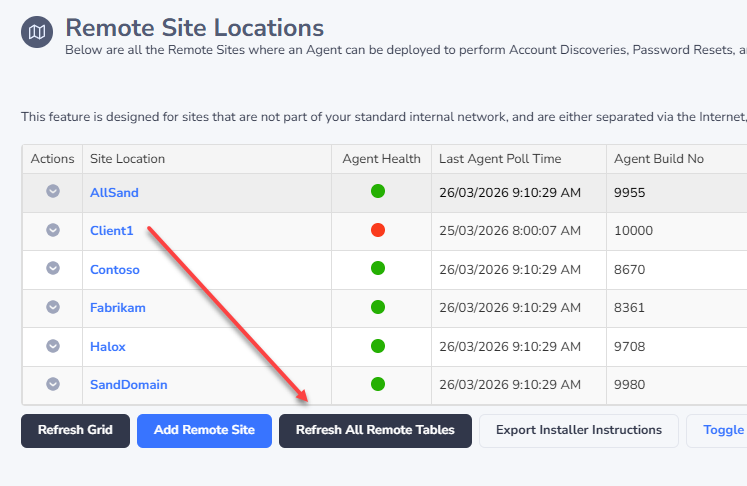
Below are a list of tables which are refreshed regularly, but if you change the contents of these tables within your install of Passwordstate, it is recommended you manually refresh the remote site tables manually, or wait until the next Maintenance Window for them to automatically be refreshed. You can manually refresh these tables on a per site basis, or for all sites at once as per the options below - when the Agent next polls (every 5minutes by default), then the tables will be refreshed.
| Table Name | Used for | When Data For These Tables Could Change |
|---|---|---|
| AccountTypes | Performing Discovery Jobs | During an upgrade |
| DiscoveryScripts | Performing Discovery Jobs | During an upgrade |
| HostTypes | Performing Password Resets | During an upgrade, or if you change any within the Administration area |
| OperatingSystems | Performing Discovery Jobs | During an upgrade, or if you change any within the Administration area |
| Scripts | Performing Password Resets | During an upgrade, or if you change any within the Administration area |
| ValidationScripts | Performing Account Heartbeats | During an upgrade, or if you change any within the Administration area |