Adding Remote Site Locations
Prior to deploying any Passwordstate Agents, you must add each Remote Site Location into the screen Administration -> Remote Site Administration -> Remote Site Locations.
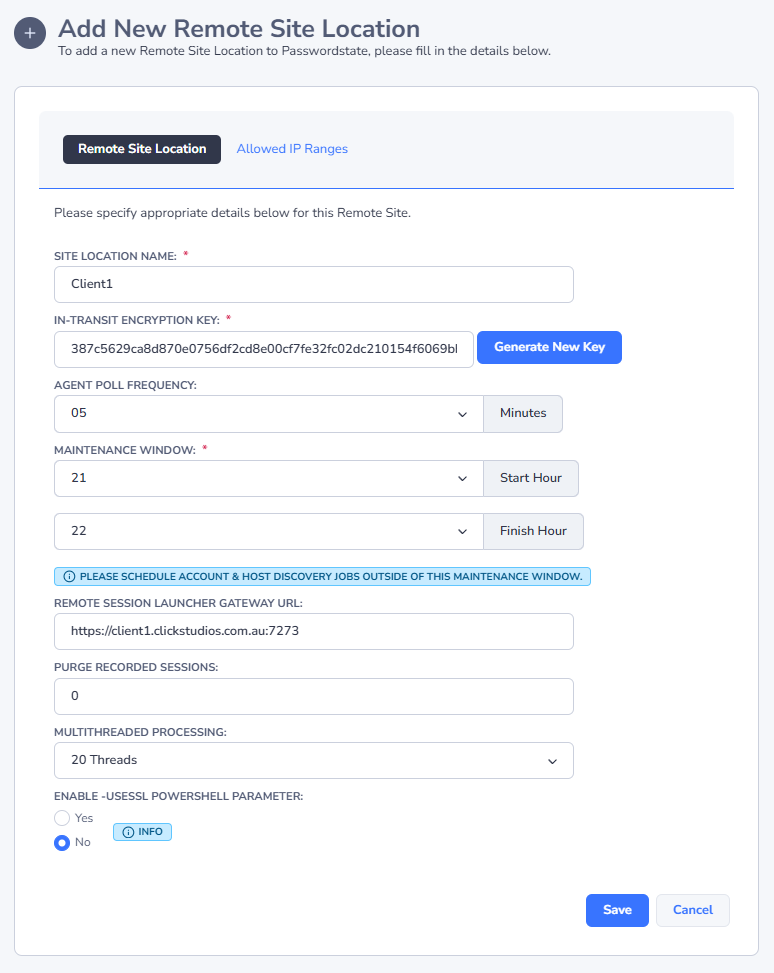
When adding a Remote Site Location, please specify applicable settings as appropriate below:
- The name of the Remote Site
- Generate a new In-Transit encryption key (used to further encrypt the BODY of the traffic in the HTTPS requests)
- Agent Poll Frequency - how often you would like the remote agent to poll back into your core Passwordstate website, to check for new tasks to execute i.e. Discovery Jobs, Account or Host Heartbeats, and Password Resets
- Maintenance Window - the period in which the Remote Agent will not execute any regular tasks
- except for refreshing the contents of the Remote Tables. The Maintenance Window gives you a time slot in which you can perform maintenance activities on the remote server, knowing it will not effect any processing tasks.
- Functioning URL for the Browser Based Remote Session Launcher
- If you intend on using the Remote Session Launcher on your Remote Site, and expect to record your remote session, then setting a value for the "Purge Recorded Sessions" can automatically remove these from disk to free up space
- Allowed IP Ranges - if you wish to further secure calls to the API for the selected Remote Site Location, you can specify various IP Addresses or ranges on the 'Allowed IP Ranges' tab