
Job Scheduling Engine
Centralize PowerShell automation, account discovery and operational jobs with secure scheduling, revision control, automatic API key rotation and comprehensive auditing.
Centralized Automation and Script Management
Passwordstate's Job Scheduling Engine allows organizations to centrally manage, execute and audit PowerShell scripts, discovery jobs and operational automation tasks.
Rather than maintaining scripts across separate servers, desktops or scheduling platforms, administrators can manage jobs from within Passwordstate and control who can create, modify, execute and review them.
Centralized PowerShell Execution
Administrators can create and manage PowerShell scripts directly within Passwordstate, providing a controlled repository for infrastructure automation and integration workflows.
- Create and manage PowerShell automation scripts
- Execute jobs manually or according to a defined schedule
- Run jobs against configured hosts and infrastructure systems
- Reference Passwordstate APIs and authorized credential data
- Maintain multiple script revisions for development and testing
- Control job management and execution through permissions
Secure API Access with Automatic Key Rotation
Automation scripts frequently need to interact with APIs or retrieve information from Passwordstate. Embedding persistent API keys directly within scripts can increase the risk of those credentials being exposed through copied files, source control or unmanaged configuration.
Passwordstate jobs can securely access the API key required during execution without embedding the key directly within the PowerShell script. The API key can be automatically rotated after job execution, reducing the exposure and reuse of API credentials.
How the Job Scheduling Engine Works
Create the Job
Create a PowerShell script, discovery job or other supported automation task within Passwordstate.
Configure Parameters
Configure targets, parameters and authorized Passwordstate data required by the job.
Schedule Execution
Run the job on demand or configure it to execute automatically according to a defined schedule.
Review Results
Review execution status, output and historical activity through centralized auditing.
Job Scheduling Engine in Action
Administrators can manage jobs, scripts, schedules, execution history and revisions from a centralized interface within Passwordstate.
Jobs Dashboard
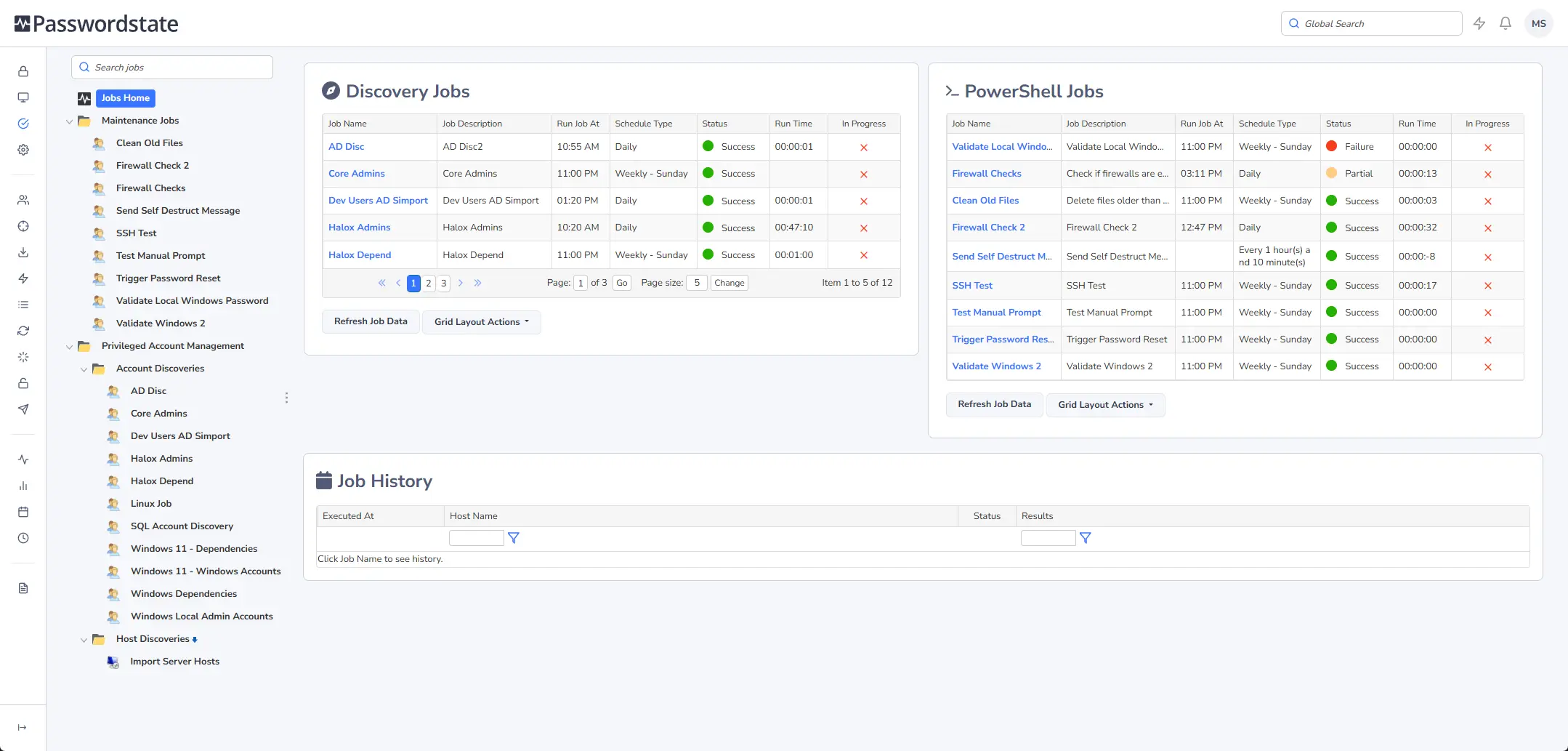
View discovery jobs, PowerShell jobs, execution status, schedules and recent activity from the centralized dashboard.
PowerShell Script Editor
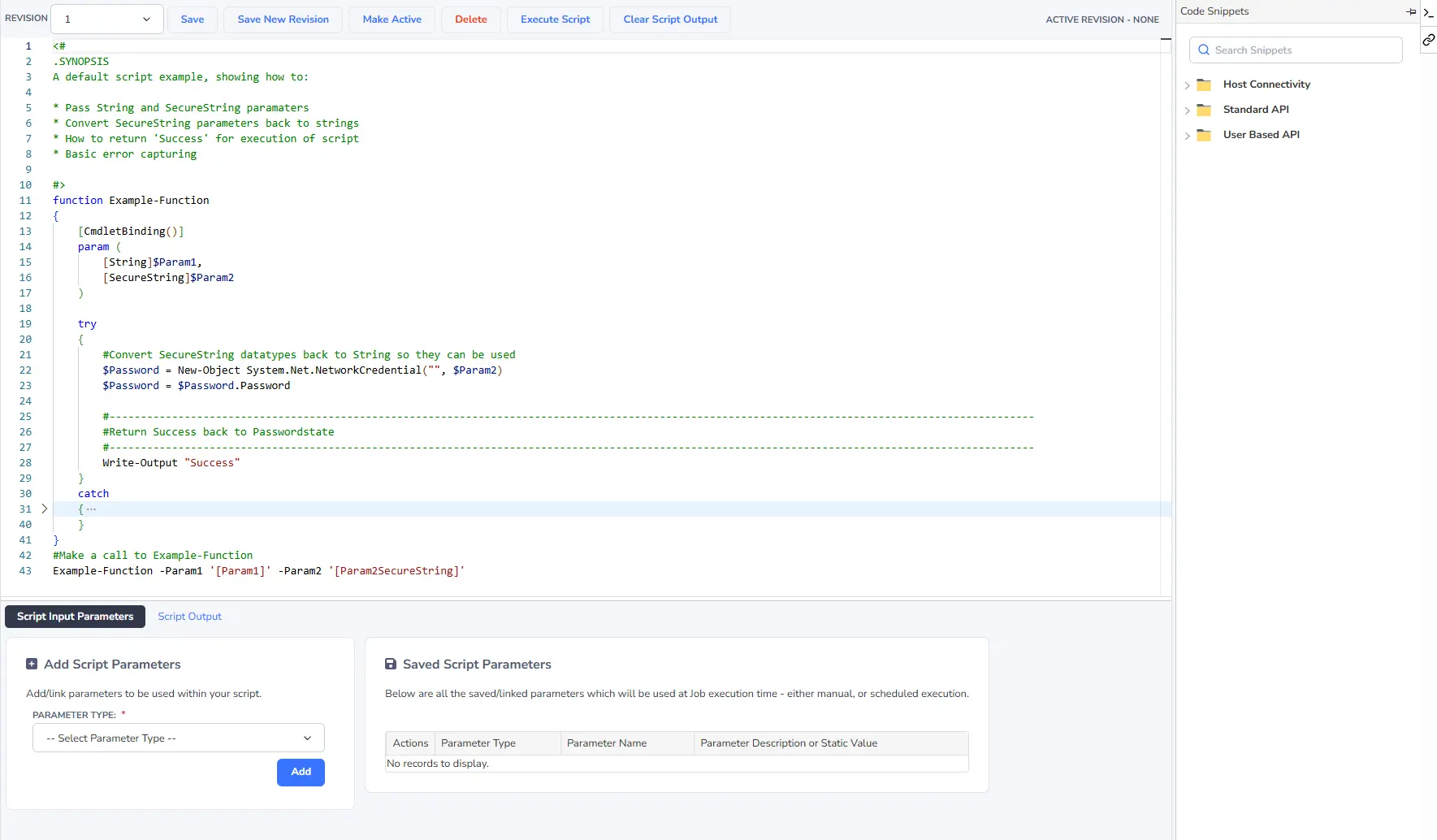
Develop, revise, test and activate PowerShell scripts directly within Passwordstate using built-in revision control.
Job Execution History

Review previous executions, results and status information for both scheduled and manually initiated jobs.
Passwordstate Jobs and Standalone Script Scheduling
The Job Scheduling Engine brings script management, credential access, permissions and execution history together within Passwordstate.
| Capability | Passwordstate Job Scheduling Engine | Standalone Script Scheduling |
|---|---|---|
| Script Management | Centrally managed within Passwordstate | Managed through the selected server, workstation or scheduling platform |
| API Key Handling | Secure API key access with supported automatic rotation after job execution | Credential handling must be implemented and managed separately |
| Access Control | Permission-based access to jobs, folders and execution functions | Commonly controlled through operating system, filesystem or scheduler permissions |
| Auditing | Centralized job execution and history auditing | Logging depends on the selected scripting and scheduling environment |
| Script Revisions | Built-in revisions with a designated Active Revision | Version management must be implemented separately |
| Passwordstate Integration | Designed to interact with authorized Passwordstate records, hosts and APIs | Requires separate API integration and credential handling |
| Operational Visibility | Jobs, schedules and execution history are managed through a central interface | Visibility depends on how scheduling is distributed across the environment |
Automation Across Your Infrastructure
The Job Scheduling Engine supports automation scenarios involving account discovery, infrastructure operations, password-related workflows and reporting.
Account Discovery
Run supported discovery jobs to identify accounts across Windows, Linux, database and network systems.
Infrastructure Automation
Execute PowerShell-based maintenance and operational tasks against configured servers and infrastructure.
Password Reset Dependencies
Run dependent tasks following password changes, supporting workflows that update services, applications or other systems that use the changed credential.
Operational Reporting
Review job results and historical execution activity through centralized auditing and reporting.
Script Revision Control
PowerShell scripts can retain multiple revisions, allowing administrators to develop and test changes without immediately replacing the version used by scheduled jobs.
The designated Active Revision is used during execution, helping administrators introduce script changes through a more controlled and predictable process.
Key Capabilities
- Centralized PowerShell job management
- Manual and scheduled job execution
- Automatic API key rotation after job execution
- Passwordstate data and API integration
- Script revision control
- Account and infrastructure discovery jobs
- Execution history and auditing
Enterprise Benefits
- Centralize operational automation
- Reduce persistent API keys embedded in scripts
- Control who can manage and execute jobs
- Maintain consistent script revisions
- Improve visibility into automation activity
Evaluate Passwordstate
Download a fully functional 30-day trial and evaluate centralized PowerShell automation, job scheduling, secure API key rotation and execution auditing within your own environment.
