
Browser Extensions
Securely capture, access and form-fill website credentials using Passwordstate browser extensions for Google Chrome, Mozilla Firefox, Microsoft Edge, Brave and other Chromium-based browsers.
Secure Credential Access from Your Browser
The Passwordstate browser extensions integrate credential management directly into the user's browser. Authorized users can save website logins, form-fill stored credentials, generate passwords, manage supported Passkeys and access Passwordstate records without interrupting their normal workflow.
Credential Capture and Storage
Capture website login details and securely save them to an authorized Password List within Passwordstate.
Login Form Filling
Form-fill authorized website credentials directly from Passwordstate, reducing manual entry and helping users avoid password reuse.
Password and Passkey Support
Generate strong passwords using Passwordstate settings and create or use Passkeys on supported websites.
Direct Vault Access
Search authorized Passwordstate website records from the extension and open, view or form-fill the required credential.
Browser Extension Features
These examples demonstrate common credential management and authentication workflows available through the Passwordstate browser extensions.
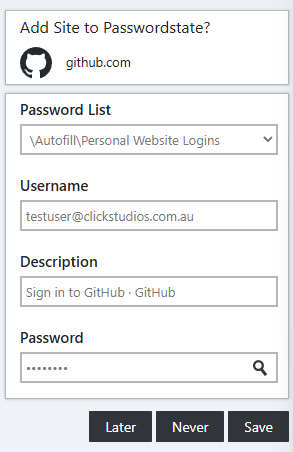
Save a Website Login
Capture login credentials from a website and securely save them to Passwordstate.
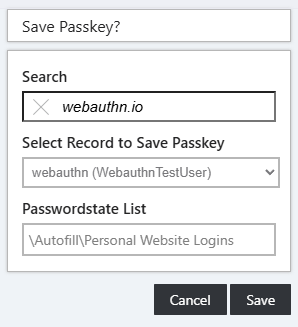
Register a Passkey
Register and authenticate with a Passkey on supported websites using the Passwordstate browser extension.
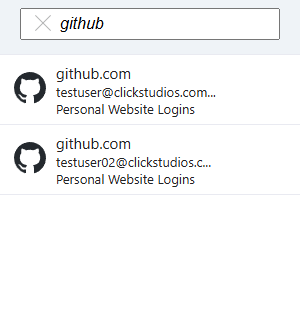
Search Your Vault
Find website credentials from the extension menu and view or form-fill the selected record.
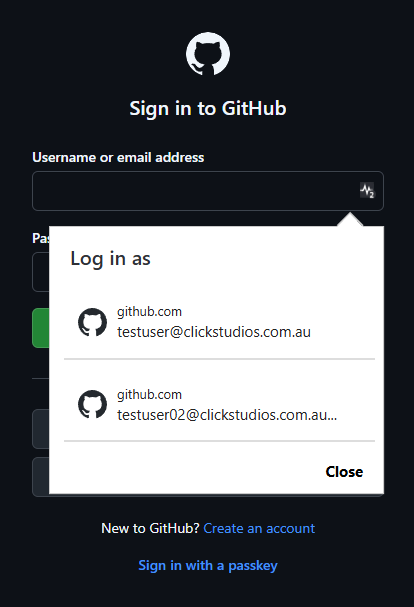
Select Matching Credentials
Select the appropriate credential from an inline overlay when multiple Passwordstate records match the current website.
Generate Long, Strong Passwords
Users can generate strong, unique website passwords directly from the browser extension rather than creating passwords that are easy to remember or reuse.
Generated passwords follow the user's configured Password Generator settings in Passwordstate. On supported websites, the extension can also register and use Passkeys, providing an alternative to traditional password authentication.
Supported Browsers
- Google Chrome
- Microsoft Edge
- Mozilla Firefox
- Brave
- Other supported Chromium-based browsers
Evaluate Passwordstate
Download a fully functional 30-day trial and evaluate secure credential capture, browser form filling and Passkey support within your own environment.
