
KB: Backup Options before Upgrades
Before you upgrade Passwordstate, it's alwa ys best practice to have a backup of your system before you start, so you can roll back in the event of a disaster.
What Needs to be Backed Up?
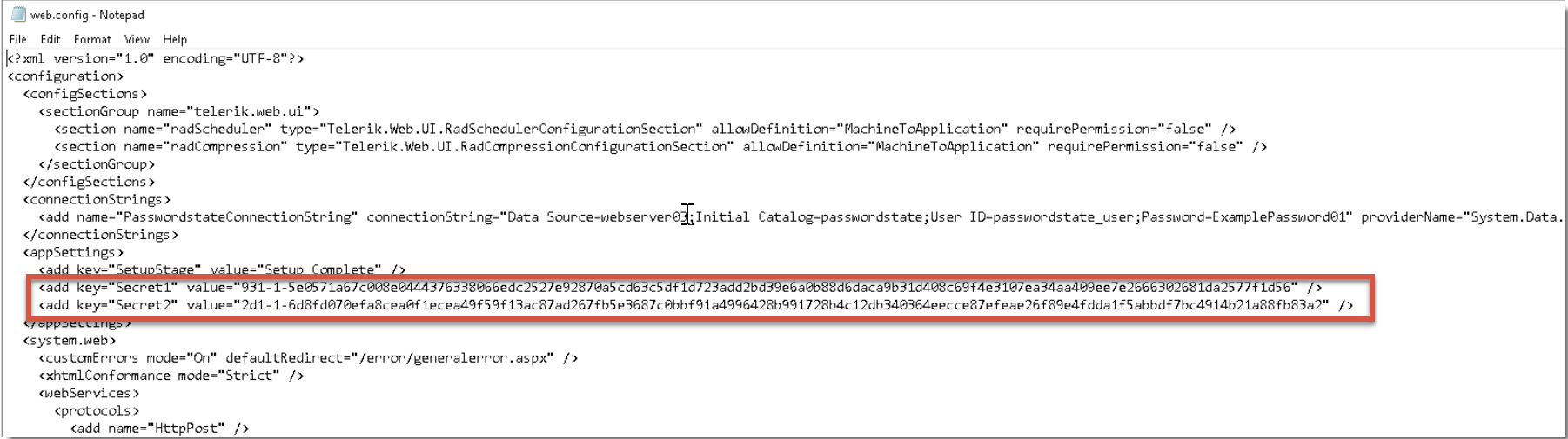
At very minimum, a copy of your entire database and a copy of your c:\inetpub\passwordstate\web.config file. The web.config file has two critical secrets in it which join to 2 more secrets in your database when you launch your Passwordstate website.
If these secrets do not join, then your Passwordstate website will not load.
Where are these secrets in the web.config file?
You should see Secret1 and Secret2 in the web.config file as per this screenshot below. If you do not see them, this means your web.config file is encrypted and this forum post explains how to decrypt the web.config file if needed: Encrypt/Decrypt Config Files
How do I back up my data?
There are a few options you can consider to backup your data:
You can manually take a backup of your install files and SQL database by following this guide: Manual Backup Using SQL Management Studio Tools
If you are hosting the Passwordstate website and SQL database on the same Virtual Machine, you can take snapshots of your server.
Passwordstate has built-in Backup feature that you can configure. Once set up this will take a backup of everything you need to restore your environment. We have two separate guides for to configure the backups which can be found below:
Domain Account With Network Share:
Backups Using Domain Account. Video of this: https://www.youtube.com/watch?v=U7f850rqD7s
Local Account with Local Folder:
Backups Using Local Windows Account. Video of this: https://www.youtube.com/watch?v=hWDbSenX-8E
How do I restore my system in the event of a failed upgrade?
If you are using snapshot technology, simply revert your snapshot. Assuming your database is on the same server then in the event of a failed upgrade you can quickly revert the snapshot and your system will be working as it was prior to the upgrade attempt.
If your database is located on a different server to where Passwordstate is installed, you'll need to restore the database if you revert your snapshot. If you do not restore the database in this scenario, this will cause issues with your website going forward.
If you have want to restore from a manual backup or the built in Passwordstate backups, please see document Passwordstate Disaster Recovery