Two Factor Authentication
It is possible to require Two-Factor Authentication (2FA), in the form of One-Time Passwords, as part of the authentication process when making calls to Passwordstate's API(s).
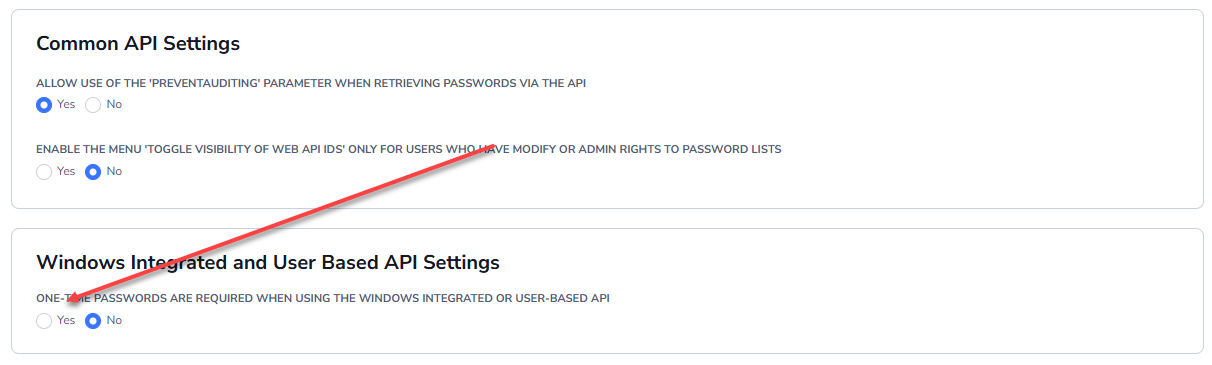
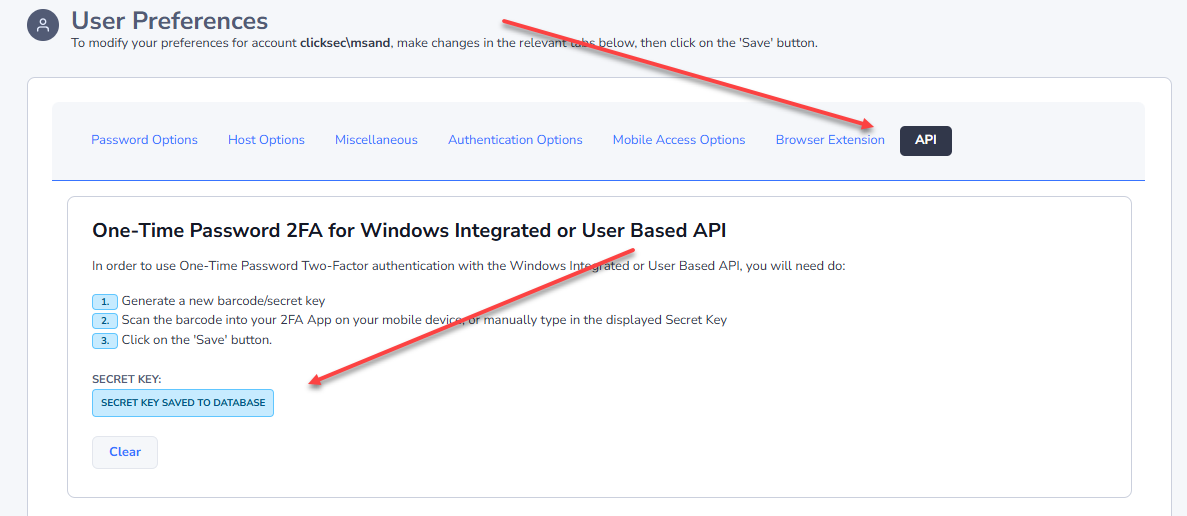
For the User Based API, each user has their own Secret Key/QR Code, and this can be generated on their Preferences screen, as per the 2nd screenshot below. If One-Time Passwords are mandatory for the User Based API (1st screenshot below), then user's wishing to use this version of the API must create the Secret Key on their Preferences screen.
Below is an example of how to pass the One-Time Password 6 digit code to each of your calls to the User Based API.
Powershell
# Powershell Request (GET - Retrieving Data)
$PasswordstateUrl = 'https://passwordstate/userapi/passwordlists/<PasswordListID>'
Invoke-Restmethod -Method Get -Uri $PasswordstateUrl -Header @{ "UserID" = "<UserID>" ; "APIKey" = "<APIKey>" ; "OTP" = "<6 Digit Code>" }