
KB: Upgrade Password Reset Portal Pre Build 9611
If upgrading your core Passwordstate installation from a version earlier than build 9611, then there is a once off manual step required when upgrading your Password Reset Portal Installation. Please follow the instructions below for this:
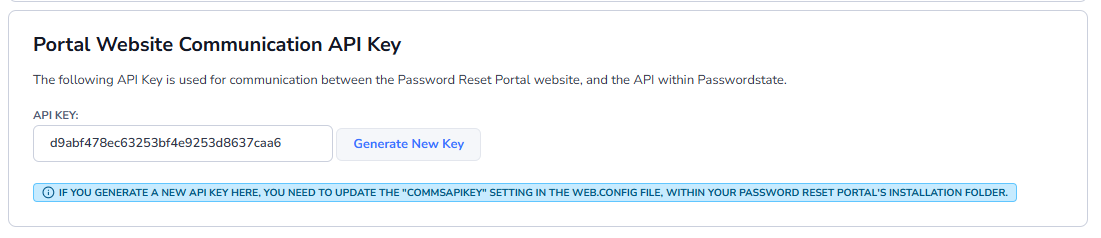
- In Passwordstate, go to the screen Administration -> Password Reset Portal Administration -> System Settings -> API tab
- Copy the “Portal Website Communication API Key” value you see below in the screenshot
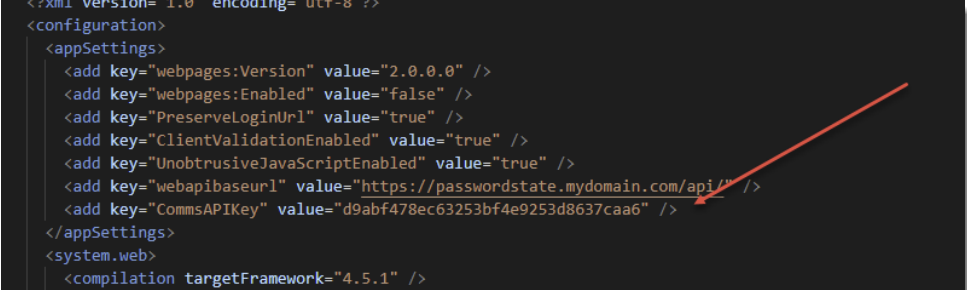
- In your Password Reset Portal folder, typically in the path of c:\inetpub\PasswordstateResetPortal, edit the web.config file and add the line you see in the screenshot below – with your API Key value. Save the file after making this change.
<add key="CommsAPIKey" value="d9abf478ec63253bf4e9253d8637caa6" />
Note: If you tried to access your Password Reset Portal site before following the instructions above, you will need to restart Internet Information Services (IIS), or reboot your server, to avoid an error message about the APIKey not being found.